Drop a folder
This page covers publishing a site without an account: what happens when you drop a folder on app.stasho.xyz/drop, what the 4-hour claim window means, and what you get if you claim.
Prerequisite: none. This is the one flow that needs no wallet, no email, and no repo.
What Drop is
Drop publishes a static site from a folder or a .zip. Drag it onto the page and it is live on a shareable URL in seconds — no account, no CLI, no build step.
Every drop is content-addressed: your files get a permanent fingerprint (a CID) and are served from IPFS. The same CID can be re-hosted by any IPFS-compatible host, including not ours. That is the part you keep regardless of what you do next.
Publish it
Open app.stasho.xyz/drop and either:
- drag a folder or a
.zipfile onto the drop zone, or - click Choose a folder and pick one.
A folder is zipped in your browser before upload. Whatever you drop, index.html must sit at the top level of the folder (or at the root of the zip) — that file is what the URL serves.
When the upload finishes you get a card with:
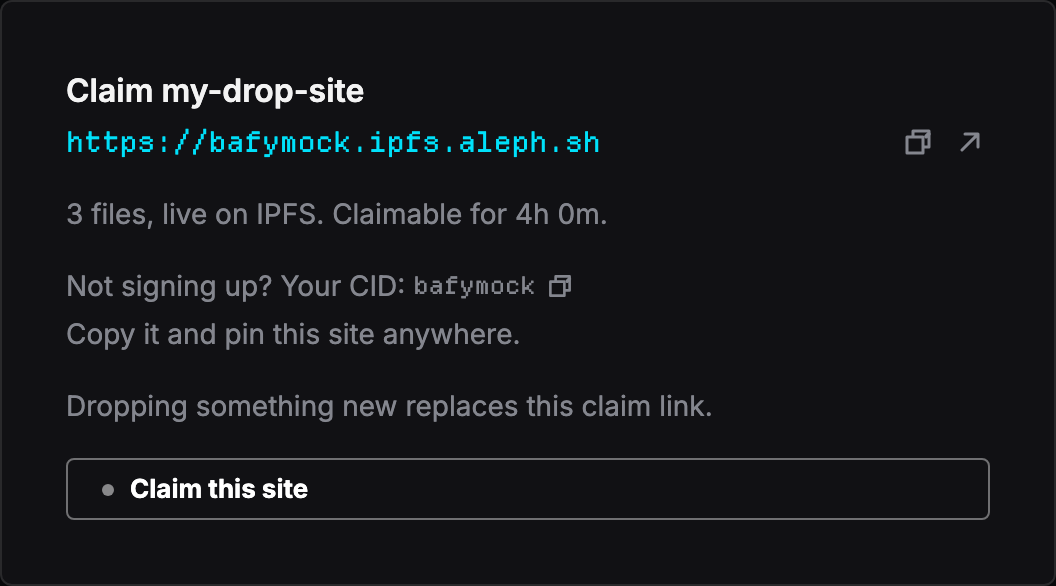
| The live URL | your site, already serving over HTTPS through Aleph's IPFS gateway. Share it, open it, embed it. |
| A countdown | how long the drop stays claimable. |
| Your CID | copyable, right there. This is the portable fingerprint of your files. |
| Claim this site | turns the drop into a project you own. |
Dropping something new replaces the claim link for the previous drop in that browser, so claim one before you publish the next.
Claim it to keep it
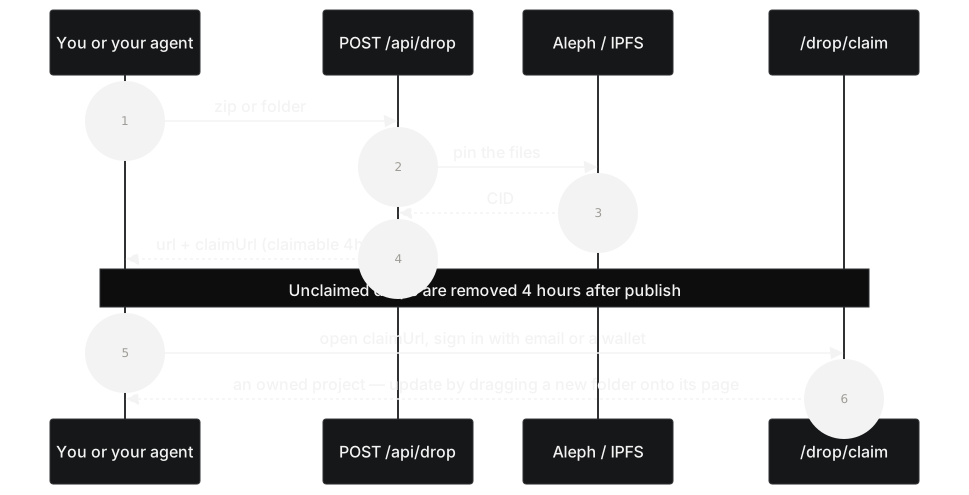
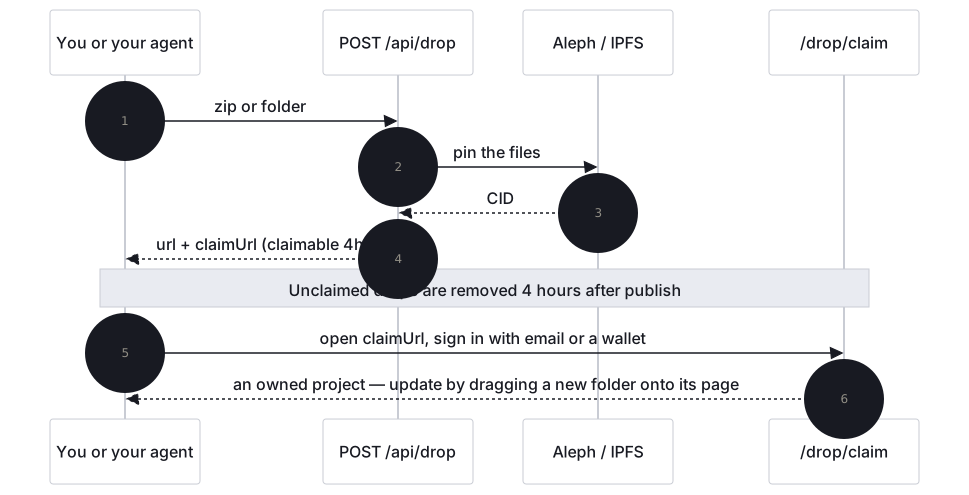
Click Claim this site. If you aren't signed in, the sign-in choice appears on that same page — pick email or a wallet, then you land back on the claim form with your drop still attached.
The form asks for a project name (prefilled from the folder you dropped) and then asks you to sign. You'll see one signature, or two the first time: one authorizes Stasho's delegate key to write on your behalf, one creates the project itself. Neither is a transaction and neither costs gas. If you signed in with email, the embedded wallet signs for you and you may not see a prompt at all.
When it completes you land on your new project's page. Claiming is free.
The claim link is tied to one browser. The token that proves you can claim this drop lives in that browser only — it is never sent to a server. Open the claim link somewhere else and the page will tell you honestly that there is nothing to claim there.
If the window closes
An unclaimed drop is claimable for 4 hours, not guaranteed to disappear at 4 hours. After the window, a sweeper removes Stasho's storage record for it. The URL may keep working for a while before that happens — treat it as gone, not as free hosting.
Two consequences worth stating plainly:
- Don't rely on an unclaimed drop. If the site matters, claim it.
- Don't drop anything secret. Dropped files are public from the moment they're published, and content that other IPFS nodes have already fetched can outlive our record of it. Removal is not deletion from the network.
If your window closed, just drop the folder again — you get a fresh URL and a fresh 4 hours.
After you claim
A claimed drop becomes a normal Stasho project with no repo behind it. From its page you can:
- Publish updates with Re-drop. Where a repo-connected project shows Redeploy, yours shows Re-drop: drag a new folder into the dialog and it publishes and becomes the new live deployment.
- Attach a custom domain. Add it in the project's Domains tab, create the DNS records it lists, and your domain serves the site over HTTPS and follows every future re-drop automatically.
- Roll back instantly. Once you've re-dropped at least once, any earlier build can be made live again by re-pointing at its CID — no rebuild.
- Verify it on-chain. The project and its deployments are Aleph messages written under your address, readable and recoverable without us.
What a claimed drop does not get is anything that needs a repo: GitHub push-to-deploy, build settings, and environment variables all belong to a repo-connected project. You can have both; they're separate projects.
Limits
These are operational values, not contract — they can change.
| limit | value |
|---|---|
| zip size (compressed) | 10 MB |
| extracted size | 40 MB, max 1,000 files |
| claim window | 4 hours |
| drops per IP | 10 per hour, 20 per day |
| concurrent uploads per IP | 1 |
Anonymous publishing also runs against a platform-wide daily budget. If drops are paused because that budget is spent, the page says so — try again later, or sign in and import a repo instead.
What doesn't work
Static files only. HTML, CSS, JavaScript, images, fonts. Anything needing a server at request time — API routes, SSR, a database — won't run. Static output from any generator is fine: a Next.js or Astro export, a Hugo or Vite build, or a hand-written page in a folder.
Extension-less URLs and SPA deep links behave differently on an IPFS gateway than on a conventional host: /about 404s even when about.html exists, and a client-routed deep link 404s when loaded directly. This is the most common "my site is broken" report and it is not a broken deploy — see IPFS hosting quirks for the fix.
Not signing up?
That's a real option, not a punishment. Copy the CID from the success card before you close the tab: any IPFS-compatible host or pinning service can serve those exact files from it. The deploy is yours either way — content addressing is what makes that true.
From a script or an agent
The drop zone is a thin wrapper over one anonymous HTTP request, and the endpoint is public. If you'd rather publish from a build script, a CI job, or an AI agent, see Publish via API for the request shape, the response fields, and the error codes. It hands back the same live URL, CID, and claim link.